Showing posts with label Instructional Design. Show all posts

Saturday, March 15, 2014

It’s time to move beyond Instructional Design: Elements of Learning Experience Design

A post by Andre Plaut @ http://www.corporatelearningnetwork.com/science-of-learning/articles/it-s-time-to-move-beyond-instructional-design-elem/

It’s time to move beyond Instructional Design: Elements of Learning Experience Design

Contributor:  Andre Plaut
Posted:  02/25/2014  12:00:00 AM EST  | 
 0  
Rate this Article: (4.4 Stars | 8 Votes) 
1
2
3
4
5
The process of designing any sort of human experience, regardless of purpose or platform, is centered on reaching a desired outcome, ideally with as little fuss and as much joy as possible.
The purpose of an experience and the platform on which the experience takes place will vary: purchasing a plane ticket on a tablet to vacation, enjoying a musical performance in a theater, or learning to code in a classroom. Although each of these experiences requires its own unique methods and frameworks, the elements that should be taken into consideration during the design process remain mostly the same
The best representation of those elements comes from Jesse James Garrett’s Elements of User Experience. While Garrett’s “elements” are most relevant to digital product design, I’ve been able to use them as a roadmap for developing learning experiences for adults.
Designing adult learning experiences that take place either online or in a classroom has always traditionally been about defining a curriculum. That process of curriculum creation is most commonly called instructional design. But, in the same way that user experience design requires much more than deciding what content should go on a website, true learning experience design requires much more than curriculum.
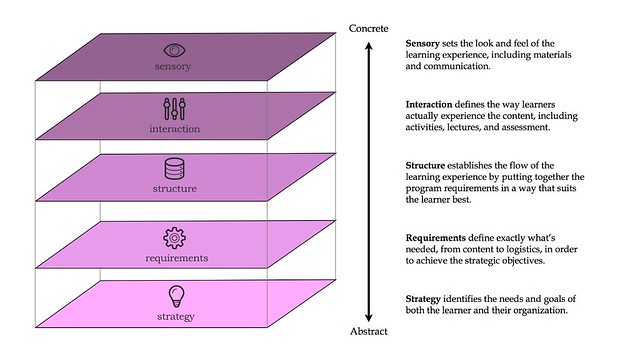
With that in mind, I took Garrett’s Elements as inspiration to create my own Elements of Learning Experience Design to formalize and communicate a design process I have struggled to explain to others.

Strategy plane

What are the needs and goals of your learners and your organization?
The goal of almost any learning experience is rooted in acquiring the new skills, knowledge, motivation, and/or confidence to change an existing behavior or create a new one. Those changes in behavior should have measurable impacts, allowing you to define key success metrics.
Before you start building anything, you should first get a better understanding of the needs you’re trying to solve for.
This means identifying the learner’s needs, which include the additional skills and knowledge required to do something differently, and their goals, which is what they hope to accomplish by doing things differently. Identifying your organization’s needs and goals are equally important. A successful learning experience must be able to address the objectives of both, regardless of how different they may be.
Ultimately, adult learners and their organizations expect learning experiences to establish behaviors that make their lives or work more efficient and effective.
As a learning experience designer, you should focus your time and attention during the strategy plane on identifying the gaps that exist between the learner and his/her desired outcome. Those gaps exist due to a lack of the following:
  • Knowledge: Do learners lack the proper information to complete a task?
  • Skill: Do they have all of the right information but lack the ability to translate that knowledge into action that could be applied to a given situation?
  • Confidence: Are they able to demonstrate or apply the skill, but do they hesitate or refuse to apply it?
  • Motivation: Are they able to demonstrate or apply the skill confidently but just don’t want to do it?
  • Access: Do they have all of the above but lack the proper tools or resources to complete a task?
Once you are able to properly identify the gaps that cause learners to struggle, you must design a solution that effectively addresses those gaps.

Requirements plane

What are the key topics, methods, activities, and logistics required to create a successful learning experience?
Once your objectives have reached a certain level of clarity, you can begin defining the content and functional requirements needed of the learning experience in order to reach those objectives.
Let’s break this down by using an example.
Start with your objectives. Let’s say a political campaign wants to decrease the amount of inaccurate voter data without decreasing the amount of data coming in.
What key metrics represent success to your organization and your learners? Based on the example’s objectives, the key metrics could be maintaining the amount of data being processed, and decreasing the number of “inaccurate information” reports.
Work backwards from there to figure out the core behaviors that support those metrics from being reached. In this example, volunteers must be able to ask accurate questions, know how to fill out data reports, and do it all pretty quickly.
Then, outline the necessary knowledge, skills, and resources needed to exhibit those behaviors. Asking effective questions is a skill built upon the knowledge of what makes certain questions effective, and what the campaign is interested in learning.
Knowing how to accurately fill out a form is a knowledge-based task requiring a limited amount of practice. Doing something quickly and accurately has a lot to do with practice, confidence, and motivation. Logistically, volunteers need to have access to data entry forms or terminals, and voters to speak to.
Next, map those components to topics and activities. By the end of the training session, learners will be able to describe why accurate data is critical to the campaign, prioritize what data is most important to the campaign, identify the right questions to ask to gather that data, and practice inputting that data into different forms or terminals.
And that’s how you arrive at your content requirements.
It’s also important to think beyond what content is required of an experience. The content outlined in our example above may close our learners’ knowledge, skill, and confidence gaps, but it will likely fail to achieve the actual objectives without functional requirements.
For offline learning experiences, these functional requirements include facilities, personnel, logistics (materials, A/V, and the like), and pre-/post-course support (including on-boarding and continued engagement and follow-up). Online learning experiences have similar functional requirements, including choosing a platform (such as a custom site versus Articulate), and finding designers and engineers to actually build the digital product, downloadable materials, and pre-/post-course support.
One of the worst mistakes you can make as a learning experience designer is to assume that functional requirements take care of themselves. When functional requirements are not built into the experience, you end up with disgruntled learners who will be much less likely to apply anything they’ve learned during the experience you’ve designed.

Structure plane

How will the topics, activities, logistics, and assessments be structured?
Imagine you’re learning how to drive.
First, your instructor teaches you about starting your car. Next, she goes over how to park your car. After that, she teaches you about the gas pedal, the brake pedal, and shifting to reverse. And finally, she shows you how to adjust your mirrors.
Does this sequence of events sound strange to you? That’s because the structure of the learning experience described above is not being taken into consideration.Once you’ve outlined your requirements and objectives, you must think about how those requirements will be structured.
In user experience and learning experience design, this relates directly to the organizing of information in order to make it usable, otherwise known as information architecture.
For an adult learning experience to be successful, the learning modules must be designed and structured in the way that is the most logical and relevant to the learner. To do that, you must first understand how different topics relate to one another in the learner’s mind (example: A key unlocks a door), in what order they usually occur (example: A door must be unlocked before being opened), and what knowledge or skill builds upon another (example: Turning a key builds the skill to turn a doorknob).
If you were to create a sales training program, would you begin with a customer entering the store, or would you begin with the product arriving in inventory? Would the section on point-of-sale systems be near the beginning, middle, or end of the program?
Structure becomes even trickier when your program involves non-linear scenarios, like setting up a multi-channel marketing campaign. Should the learner know about Google Analytics before or after Facebook Paid Advertising? There are valid arguments to either option, but the real question is what makes most sense to the learner
To answer that question, you’ll often have to look back at your objectives and learner needs. How much do you know about your learners, their daily responsibilities, and their environment? If you’re still finding it difficult to determine the structure of your learning experience, you should probably do more research.
Structure also applies to the functional requirements of your learning experience. When will learners need the most support? Which topics or skills present the largest challenge to your learners? You should also consider whether or not the learning environment is conducive to the type of experience you’re designing (online vs. offline, short-term vs. long-term, facilitated vs. self-led, and the like).

Interaction plane

What will learners actually be doing, hearing, and seeing during the learning experience?
The interaction plane deals directly with designing the materials, activities, lectures, and discussions that make up the learning experience. This is where instructional design lives. As an instructional designer, you will focus most of your efforts on defining exactly how learners are introduced to new skills and knowledge, and what practice and application look like those skills.
When introducing new knowledge to learners, it helps tremendously to root it in existing knowledge. This can be done through the use of use analogies, previous experiences, and common cultural references. To use these methods effectively, you must have a strong grasp of your learners’ perspectives and experiences as they relate to the content.
Acquiring new skills demands a different approach. Learners must be able to actually apply new skills to both real and hypothetical problems within the learning experience in order to become proficient. Think of how many times you had to practice parking a car in both empty and full parking lots before you felt comfortable parking on a daily basis. You must create opportunities that allow learners to practice and apply their new skills in supportive environments.
This is also the time to think about how your learners’ progress will be tracked. Assessment criteria should first be defined within the requirements plane, and then built into the program in the structure plane. Exactly which tools and processes are used to evaluate a learner’s skill-level, and how progress is communicated back to learners should be defined here.

Sensory plane

What will the learning experience look and sound like?
The experience you design must be able to cater to your learners’ sense as well as align with your organization’s brand. The sensory plane applies to all materials and instructions designed for the program, including presentation decks, guides, web sites, lesson plans, worksheets, activity materials, and so on.
The sensory plane allows your materials to implicitly communicate information to your learners about the experience they are about to have. The tone of your written content, as well as the visual design of your materials, should represent your organization’s branding and communicate the mood of the experience, be it professional, fun, or quirky. In the same way that content should be strategically structured, the visual design of your materials should be cohesive and consistent.
The sensory plane is your opportunity to create a learning experience that is both functional and beautiful. Decks are designed as visual references to anchor learners, but if they’re filled with too much text and poorly chosen images, decks end up being frustrating and useless. A lack of verbal instructions will frustrate learners, but it’s still better than unclear or misleading instructions.
People, regardless of their preferences, are drawn to polished, well-designed materials and clear communication. The sensory layer creates a single, cohesive experience that allows learners to focus on gaining new skills and not deciphering their learning environment.

Conclusion

Designing learning experiences must be treated in the same way as designing any sort of user experience. Learners, just like users, have needs that can only be solved through proper research, design, validation, and iteration.
Anyone involved in adult learning should step outside the limiting boundaries of curriculum design in order to account for the learner’s entire experience. By only focusing on content, we are missing out and what actually makes up a person’s reality, including the environment in which they’re learning in, and their lives before and after the learning experience.
By taking each of these elements into consideration, any teacher or instructional designer can start begin to think beyond those limitations, and look to create immersive and enriching experiences for their learners. This not only allows us to be more effective at teaching others, but it also establishes a higher level of quality that people should expect of a learning experiences.

Tuesday, February 18, 2014

UX for Learning: Design Guidelines for the Learner Experience

A post by Dorian Peters @ http://uxmatters.com/mt/archives/2012/07/ux-for-learning-design-guidelines-for-the-learner-experience.php

UX for Learning: Design Guidelines for the Learner Experience

Published: July 24, 2012
“With educational applications for kids, corporate eLearning, and online degree programs, more and more UX designers face design briefs for creating digital experiences with an educational purpose.”
With educational applications for kids, corporate eLearning, and online degree programs, more and more UX designers face design briefs for creating digital experiences with an educational purpose. Other applications, whether they’re new or launching new features, often present micro-learning experiences that gently teach users how to use the software.
But as UX designers, how much do we really know about how people learn? And does design really affect learning?
Absolutely. Research shows that user interface and interaction design decisions significantly affect how well users learn. For a manifesto on that topic, see my article “Say Hello to Learning Interface Design.”Nevertheless, for the most part, we go into these projects armed with a wealth of UX knowledge about how people use technology, but without any sound knowledge about how people learn.
In this article, I’ll begin to fill that gap by presenting some design guidelines that derive from key findings from relevant psychology and education research on learning with technology. These findings relate specifically to user interface and interaction design for digital learning experiences. I’ve drawn most of these guidelines from the pioneering work of educational psychologist Richard E. Mayer, whose discoveries form the foundation of much multimedia instruction today.

What Is Learning Experience Design (LXD)?

“A big part of LXD is designing a user interface in a way that supports and enhances the cognitive and affective processes that learning involves.”
In much of design, we aim to craft a user experience that meets business or communication goals. In learning experience design, the goal is to help someone learn something. It’s about improving learning outcomes and the quality of the learning experience. A big part of LXD is designing a user interface in a way that supports and enhances the cognitive and affective processes that learning involves.

A View of the Landscape: Examples of Digital Learning

Digital user interfaces for learning include digital environments, technologies, and tools. Specific examples include:
  • learning objects—These are self-contained experiences based on just one learning objective. Users can use them as needed or combine them for a more complete course. You’ll find a slew of these at The Learning Federation.
  • educational games and simulations—Computer games designed around educational goals—like Global Conflicts and the NASA gameMoonbase Alpha—are called serious games.
  • Learning Management Systems (LMS)—These large software systems manage tens or even thousands of courses and students. They provide tools for course portals, assessment, and synchronous and asynchronous interactions. Examples include Blackboard, Coursera, shown in Figure 1, and the open-source LMS Moodle.
  • synchronous collaborative learning spaces—Virtual spaces in which learners get together in real time. These might include video, chat, shared whiteboards, note taking, and wikis. Two examples are Adobe Connect, shown in Figure 2, and KnowledgeForum.
  • Intelligent Tutoring Systems (ITS)—These computer systems provide customized feedback to students without human intervention—for example, AutoTutor, shown in Figure 3, and DeepTutor.
  • corporate eLearning courseware—Companies deliver courses via digital technology to teach their employees workplace skills like how to use software or soft skills such as customer service or sales strategy. Examples include Savv-e, shown in Figure 4, and ClearlyTrained.
  • 3D Virtual Learning Environments (VLEs)—Purpose-built, 3D worlds like JumpStart and Virtual Singapora, shown in Figure 5, structure learning. Learning of all types of subjects—from math to drama—also takes place in off-the-shelf worlds like Second Life.
  • mobile learning applications—There is a list of mobile learning applications for children at “Smart Apps for Kids.” Figure 5 shows an example, PBS Kids.
Figure 1—Coursera
Coursera
Figure 2—Adobe Connect
Adobe Connect
Figure 3—AutoTutor
AutoTutor
Figure 4—Savv-e
Savv-e
Figure 5—Virtual Singapora
Virtual Singapora
Figure 6—PBS Kids mobile learning applications
PBS Kids mobile learning applications

Guidelines for the Design of Learning Interfaces

“Extraneous visuals are especially problematic in regard to learning. … Extraneous imagery adds to cognitive load.”
Here is a summary of guidelines that relate specifically to user interface design from the larger set of findings by Richard E. Mayer.

1. The multimedia principle: People learn better from a combination of text and visuals rather than text alone.

This is not exactly breaking news for visual designers, but it’s important to know that the inclusion of visuals is not just nice; it improves learning. Visuals might include illustrations, photos, infographics, diagrams, or comparative charts, as well as videos or animations. Text refers to both written text and audio. Having said this, I must note that it’s necessary to design combinations of text and visuals properly to yield learning advantages.

2. Graphics should be relevant, not merely decorative.

Extraneous visuals are especially problematic in regard to learning. While it might be tempting to load up a lesson on global warming with various photos of natural wonders to enhance its visual appeal, extraneous imagery adds to cognitive load. Whatever portion of users’ brain power goes into processing these photos is unavailable for learning. This doesn’t mean a user interface can’t be beautiful. But find ways of guiding visual focus to what matters and lean toward minimalism when in doubt.
Mayer’s findings refer not to graphic user interface (GUI) design, but to graphics that serve as an adjunct to text—such as images that accompany the text of a lesson. In this case, steer away from decorative or representational graphics—for example, generic stock photos—and instead focus on providing explanatory graphics that help the learner process and interpret information, including:
  • relational graphics—like comparative graphs or interactive systems models
  • graphic organizers—which structure the concepts a lesson’s text discusses
  • transitional graphics—which show change over time
  • graphics showing things that would otherwise be invisible—for example, an atomic structure, greenhouse gas flow, or the global movement of money
  • graphics that help place learning in context—for example, a GUI metaphor or virtual world

3. Use animations to teach physical procedures and still images to teach processes.

“People learn physical procedures … better by watching videos or animations. In contrast, they learn conceptual processes … better when they are illustrated by a series of static images.”
People learn physical procedures—such as how to fold origami, assemble a piece of furniture, or tie a square knot—better by watching videos or animations. In contrast, they learn conceptual processes—for example, how rain forms—better when they are illustrated by a series of static images. Apparently, this is because, from early in human evolution, we’ve been hardwired to learn motor skills by observation. The understanding of complex processes, however, is not quite so primal. In this case, an animation does too much of the work for us and removes pacing out of our control, so we become passive viewers. In contrast, a series of static images requires us to make logical connections between them, which helps us to learn, and we can do this at our own pace.

4. To promote understanding, simplify visuals or make them abstract.

People learn processes and principles better from simplified visuals. For example, simple line drawings that illustrate a process such as cellular mitosis are generally better than a series of photos showing the real thing in microscopic imagery. A computer animation that omits extraneous background detail is simpler than a video that shows everything. However, there are likely to be some exceptions—for example, advanced practice—that call for highly realistic simulations such as in aircraft simulators.

5. Don’t separate related text and visuals.

In line with the basic design principle of proximity, learning research has shown that people learn better when text relating to an image appears near that image. As obvious as it sounds, designers often violate this guideline. For example, rather than adding a list of labels to a diagram’s caption, create callouts, drawing lines to various parts of the diagram and labeling those parts directly; and rather than providing feedback for an incorrect answer at the bottom of a screen, include it beside the learner’s answer.
Also, include an explanation in the form of a narration whenever possible. If you can’t use narration, provide text for learners to readbefore playing a video. While you can present these on the same screen, avoid having text appear on a screen at the same time a video or animation is running. That would be too much visual information for learners to take in at once.

6. Use virtual agents to deliver instructional content.

“People learn better when they perceive social presence.”
Research shows that people learn better when they perceive social presence. For this reason, using a conversational tone in first or second person increases learning. We are hardwired to pay more active attention when we’re dealing with human beings rather than machines. This is probably why virtual coaches, tutors, characters, or avatars help people learn. Keep in mind that you should use agents for instruction, notentertainment. Agents are good for providing hints, explanations, and demonstrations, but you need to use them sparingly to prevent their becoming irritating.
Interestingly, realistic characters are not more effective instructors than cartoon characters. In fact, an agent does not even need to be visible, as long as learners hear a voice. Also, a voice should be a human voice rather than a machine voice. So don’t blow your budget on a 3D animated avatar with a robotic voice. A simple illustration with a human-voice narration—regardless of whether that human is visible—is enough for learning gains. As a final note, while having a realistic human appearanceis not necessary, learners do benefit from agents who exhibit realistic human behavior such as human-like eye gaze and gesturing.

7. Break complex information into chunks and provide pre-training.

Two basic ways of managing complex information are either to break it into segments, or chunks, or to extract difficult terms or key concepts and deal with those first, which is called pre-trainingSegmenting means breaking content into parts that deal with just one, two, or three steps or concepts at a time.
Lynda.com provides a wonderful library of training courses on everything that relates to the Web. If you haven’t already seen the site, it’s well worth a visit. Their instructional approach is to provide high-quality videos of best practices or software training. This works well because video is a good medium for demonstrating procedures. They manage complexity, and give users control over the pacing, by breaking each course up into bite-sized concept chunks. This also means people can select and review just the bits they need when they need them.

8. Avoid irrelevant video, audio, stories, and text.

Research shows that adding sidebar stories for the sake of interest hurts learning. It may seem sensible to spice up a lesson on the physics of lightning with a sidebar on the world-record holder for the most lightning hits. However, research has proven that this is not a good idea. The message here is to focus on what is inherently interesting about the content rather than adding extraneous detail—especially if specific learning goals are at stake. Along these lines, adding music or audio to learning experiences for ambiance impairs learning.

9. Set learning in a real-world context to facilitate knowledge transfer.

“The closer a learning experience is to a real-world context, the more likely learners will be able to transfer what they’ve learned to the real world.”
The closer a learning experience is to a real-world context, the more likely learners will be able to transfer what they’ve learned to the real world. One criticism of video games for learning stems from their low transfer rates—skills people learn in the game world don’t transfer to the real world. One company thought a corporate orientation game set in a sci-fi world would have greater appeal. However, in reality, it had little uptake because learners couldn’t see its relevance. Moreover, learners would be unlikely to transfer concepts they learned in such an environment back to the real world, because there would be no contextual cues embedded in the learning.
If people need to adapt the skills they’re learning to multiple environments and diverse circumstances, include examples set in more than one context. When you expose learners to multiple contexts, they are better able to extract essential principles and transfer them to various real-world scenarios.

10. Provide informative feedback.

Avoid providing feedback that sounds personal or draws attention to the self instead of the task—for example, “good job” or “you got that wrong.” Also, avoid giving feedback that is uninformative like “correct” or “incorrect.” While an instructional designer writes the feedback, as a user interface designer, you need to design space in the interface for rich forms of feedback, remembering to place answers near the questions to which they refer.

11. Choose your tools based on learning activities.

Different types of tools are most effective for different types of learning activities. For example, asynchronous communication tools that allow interaction over time—such as discussion forums—are well suited to learning experiences that require reflection or independent research. Synchronous tools like chat or live online classroom sessions are well suited to experiences that benefit from group synergy and social presence.

12. Know when to give learners control.

“Allow learners to control their pace through a learning experience. Give them video and animation controls, let them review previous content, and allow them to exit at any time.”
Allow learners to control their pace through a learning experience. Give them video and animation controls, let them review previous content, and allow them to exit at any time. However, you should be more careful about giving learners control of the sequence of instruction.
Research shows that novices are not able to effectively design their own path through non-linear content or decide how much practice they require. This impacts how you design both navigation and information architecture. You should allow learners choices regarding what topics to read or activities to do only if they have prior knowledge, in advanced courses, when chunks of content are not interdependent, or when designing a learning experience to be supportive and informational rather than for skill building. Along these lines, research shows that unguided exploratory learning is not effective for achieving specific learning outcomes.

13. Design learning games and simulations in strict alignment with learning goals.

The recent trend in gamification has led to the assumption that adding badges, rewards, and scoreboards to just about anything makes it a game. The main point to take away from games and learning is the notion of extrinsic versus intrinsic motivation. While it’s tempting to think that adding game rewards and goals would increase learners’ motivation and thus help them to learn better, you have to ask what is motivation about? Are people more motivated by learning a topic or by collecting points?
In fact, research has shown that learning does not improve when a learner’s focus is on game goals rather than learning goals. You could have learners practice and teach them facts by placing them in a virtual Jeopardy-style game show, but this would decontextualize the knowledge making it unlikely to transfer. Effective learning games retain contextual cues, align game goals with learning goals, and drive interest with intrinsic motivation. More on that later.

14. Be aware of the expertise reversal effect.

“Experts are more flexible and can learn just as well from text alone as they can from a combination of text and visuals.”
A major caveat to everything I’ve said so far is that the rules break down when it comes to experts. This is known in the research world as theexpertise reversal effect. In essence, all of the guidelines I’ve provided are especially important for novices. If you’re teaching biology or management skills to non-experts, everything applies. However, if you’re teaching advanced concepts in biology to a doctor or management strategy to a CEO, these rules may not apply. Such design decisions usually make less impact on such people. Experts are more flexible and can learn just as well from text alone as they can from a combination of text and visuals. Experts don’t need information to be chunked, and they can handle having more control over their instruction.
In general, following design guidelines that benefit non-experts won’t negatively impact experts. However, in a few cases, the rules for designing for novices do actually decrease learning outcomes for experts. Therefore, if you’re designing for an audience of experts, it’s worth reading more about their unique requirements—first, in Clark and Mayer’s book; second, by looking up the research on the expertise reversal effect.

Unleash Intrinsic Motivation

“Motivation is key in learning.”
Motivation is key in learning. Therefore, when considering approaches to digital learning, it’s worth giving motivation some extra attention. In addition to the points I made earlier about the pitfalls of gamification and the limits of extrinsic motivation, I want to focus now on how UX professionals can become more creative about uncovering intrinsic motivation.
Too often, intrinsic motivation gets skimmed over in digital learning design, but UX professionals are just the right people to tackle this. It takes empathy, ideation, and a knack for storytelling. One prevalent example is kids and literacy. The market abounds with drill and practice software for spelling and phonics. But imposing extrinsic motivation in the form of points, competition, and speed rounds has obvious limitations. Can’t we do better?
We need to ask ourselves the question: what is inherently motivating about reading and writing? The answer? There are many motivations: storytelling, engagement with characters, self-expression. Kids get wildly excited by Harry Potter. They use social media to tell the stories of their own lives. How can we tap into this kind of motivation, which is so much more powerful than badges and scores, to help teach literacy skills? Might we place spelling words in stores instead of random sentences? Could we ask students to write a letter to Hogwarts rather than just fill in a template? Could we design collaborative, global story-writing activities so all children, even lower-ability writers, could be part of something special? Could we ask famous writers to contribute?
The point is, while the onus of activity design rests with teachers and instructional designers, there may be times when UX designers have an opportunity to contribute to effective learning. In these cases, challenge your team to go beyond extrinsic motivation and tap into the heart of intrinsic motivation—what intrinsically makes your topic exciting.

Going Deeper

As I’m sure you’ve guessed, there is a lot more to designing for learning than what I’ve presented here. The trouble is, much of what is known is buried in academic research. If designing for learning is a significant part of your job, here’s where to turn next to enrich your credentials:
  • Read the book. For a complete list of principles, examples, and in-depth explanations of the psychology behind them, read Mayer and Clark’s book E-learning and the Science of Instruction.
  • Follow my blog. I have been posting information on LXD on my blog,Learning Interface Design, regularly since 2005.
  • Read the research. Keep up with new publications on this research topic by following or joining the Learning Interface Design research-sharing community on Mendeley.

In Conclusion

These guidelines provide a solid start to informing our practice of the design of learning experiences. As digital learning continues to enrich and, in some cases, even displace traditional learning strategies, I anticipate that a rigorous field of research and best practices that focus specifically on the design of user interfaces and experiences for learning will begin to develop.